
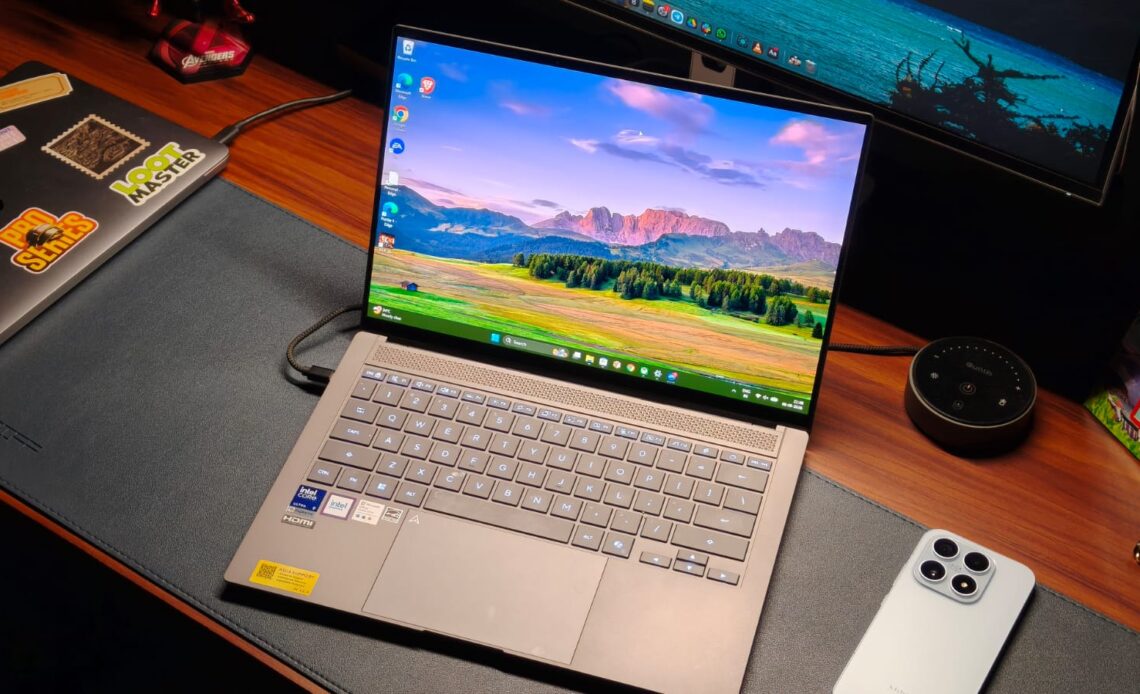
If you’ve dabbled with premium laptops before, there’s about a 100% chance you’ve seen Asus’s ZenBooks around. These laptops from the Taiwanese maker have served professionals in need of respectable power without carrying a brick-like gaming laptop. I’ve personally tested many of these devices, and every single one of my reviews has ended with something like “Oh, this laptop is great and worth the recommendation.” That’s because Asus knows its target audience and caters to their needs almost perfectly. And if you’re in the market for an ultra-premium laptop, Asus has just announced something for you: the ZenBook S14 UX5406.
I’ve been using a basic MacBook Air M1 for the past five years. It’s served me well, and, despite my years of testing laptops, I’ve only once felt the urge that it would be amazing if that review unit were mine. The laptop I’m talking about is the ExpertBook Ultra. Shifting focus a bit towards the product in hand, it’s been three weeks since I switched to the S14, and truth be told, it doesn’t put a foot wrong. Maybe it’s the gorgeous design, the stunning display, the rapid performance, or just a mix of all three, but the ZenBook S14 makes me want one. But is it worth it for your workflow? This review will answer that for you.
Asus ZenBook S14 Review
Summary
The Asus ZenBook S14 doesn’t put a foot wrong. The ceraluminum design is unique in a way that screams premium while still being sophisticated. The display can best be described as near-perfect, with insane levels of color and brightness. Beyond that, no amount of work can tax the Core Ultra 9 processor, and the battery life comfortably lasts a full working day. Not to mention the speakers, which have a really good soundstage.
Design & Hardware

Design is a very subjective matter, but if there’s one thing we all can expect from Asus, it’s that these guys know how to create beautiful machines. Sure, you must know the cold, aluminum touch by now, which is used by most premium laptops, including my beloved MacBook. Well, Asus has formulated something they call Ceraluminum. It’s essentially aluminum with a ceramic coating on top.
It’s hard to describe it in words, but I’m going to try anyway. The Asus ZenBook S14’s top feels like that high-end matte marble flooring you might see in stores. It feels very premium to the touch, with a unique patterned finish I’ve never seen before. Every time I took it to a coffee shop, I noticed people looking at just what I was using. I’m also a fan of the subtle ZenBook branding that’s very sophisticated. While you don’t have to worry about fingerprints messing up the finish, oily fingers will leave hard-to-remove marks, so please wipe off the Doritos dust before using the laptop. You do get a couple of color options, including a grey and white.
Open up the laptop, and the ceraluminum finish makes way for a polished aluminum keyboard deck, and I’m a fan. The S14 carries the same sophistication here. Above the deck sits what looks like a speaker grille, though it’s actually part of the cooling system, whose shape reminded me of the cheesegrater Mac Pro (reference only for ages 15 and up).

While the color options might be a bit boring, it’s important to remember that the ZenBook S14 is for the type of person who’s giving a presentation at noon, closing another client at lunchtime, and maybe flying to another country for an urgent meeting, in other words, a busy professional. So, another important thing for any such person is portability. The ceraluminum inclusion made me think the ZenBook S14 might weigh a lot, but Asus has managed to limit the weight to just 1.2 kg, which is really good for a laptop with crazy internals. This meant I could carry the S14 to different coffee shops without hurting my back.
I also wasn’t worried about damaging the S14 in my backpack because it’s a durable machine. Of course, I didn’t toss the laptop intentionally. However, I did check for chassis flex. On the keyboard deck, there wasn’t any, and even the top stayed in shape after I applied some serious force.
As far as ports are concerned, Asus has almost everyone covered. On the S14, you get two Thunderbolt 4 ports (for charging and display), a full-size HDMI 2.1 port, USB 3.2 Gen 2 Type-A, and a headphone-microphone combo jack. The only minor gripe I have is the fact that both USB-C charging ports are on the left side, which can force you to do some cable gymnastics.
Keyboard & Trackpad

A good keyboard is the bare minimum for a professional laptop, let alone a ZenBook. As a surprise to absolutely no one, the ZenBook S14’s keyboard is just great. The layout is standard, meaning I didn’t spend a week trying to get used to a special key. The actuation energy is slightly higher than that of my MacBook, which provides a more tactile experience. The feedback is solid overall yet not very loud, which is ideal when working in an office. The keyboard is also backlit, with different brightness levels to choose from. Since I got the gray variant, the key lettering contrasts well with the lighting.
When I was reviewing the Asus ExpertBook Ultra, I just fell in love with that haptic trackpad, wishing every laptop incorporated the same. Well, I’m also the first to admit that not everyone loves a haptic trackpad. There are people who’d take the physical click over fake ones. And if you’re one of those (I’m not judging), then the S14’s trackpad is made for you. Never have I ever felt mechanical clicks more sophisticated than here. The clicks are precise, and the feedback is just awesome.
Display & Camera

Unlike smartphones, where almost all displays are the same, Asus has held a high place in my display rankings. After all, these guys were one of the first to bring OLED tech to laptops. And the ZenBook S14 is no different. It features, dare I say, a perfectly spec’d 14-inch 3K (2880 x 1800) Lumina OLED panel with a 120Hz refresh rate. At a response time of just 0.2ms, everything feels quick and snappy. As expected, the video-watching experience of the S14 is simply lovely.
Colors pop off the screen with a punchy vibrancy while still keeping natural skin tones. The details are crisp enough to help you make out the fine facial features. Even the HDR performance is stellar, with the panel reaching a peak brightness of 1,100 nits. I had no problems working with the laptop outdoors, though, by outdoors, I mean inside a cool cafe, since only a lunatic can sit outside in the 45-degree Indian summer heat. Just be careful of the reflections, though, as the glossy panel does catch a lot of light.

All that being said, Asus hasn’t just designed the S14’s display for movie watchers. For creators, the S14’s panel covers 100% of the DCI-P3 color space. It’s VESA CERTIFIED Display HDR True Black 1000 certified, and the colors are PANTONE validated. The 16:10 aspect ratio gives you more vertical space than a typical laptop display, meaning you can fit a few extra spreadsheet columns without having to scroll. Still, the best part of the S14’s display is that the trackpad isn’t the only way to interact with it. It’s also a touchscreen. Honestly, touchscreens on laptops make a lot of sense for people on the go and for employees like me. The best compliment I can give is that after the review period, I accidentally touched my MacBook’s display, thinking it would do something.
The 1080p webcam is fairly standard. While it won’t break any image-quality benchmarks, the videos it took during conferencing were decent, with good-enough sharpness and okayish colors. It also supports Windows Hello, so signing in to your laptop is quick and easy.
Performance

A professional laptop needs to pack a punch in terms of performance. It should not only keep up with your needs but also have ample juice in the bank to ramp things up if needed. The Asus ZenBook S14 ships with the newest Panther Lake Intel Core Ultra 9 386H processor. It includes 16 cores: 4 performance, 8 efficiency, and 4 ultra-efficiency. The processor is coupled with an Intel iGPU, up to 32GB of LPDDR5X RAM, and a 1TB PCIe 4.0 SSD, whose read and write speeds we measured at 6972.59 MB/s and 3367.89 MB/s, respectively.
As you might have guessed, the everyday performance of the Asus ZenBook S14 is nothing to complain about. Apps launch instantly, without a loading delay. The RAM is enough to keep over 25 Chrome tabs while also running Spotify in the background. My daily workload, which is mainly on Chrome, was no match for the Core Ultra 9’s mammoth capabilities. So to properly fire up the processor, I first installed Da Vinci Resolve and tried editing a reel. Truth be told, I’m not the best editor, nor do I know how to add effects, but with color grading and multiple 4K streams, the laptop handled everything well without slowing down. For all my programmer friends, don’t worry. I installed VSCode and ran a few Python programs for fun. The result was lightning-quick runtimes.

Since this is a review, and my workflow can only paint a certain picture, I also ran a series of benchmarks to put the Asus ZenBook S14 against its peers. Starting with CineBench R24, the laptop scored 960 in the multi-core test and 125 in the single-core test. For some much-needed context, that’s almost double the CineBench score of last year’s ThinkPad X Carbon. In PCMark 10, the Core Ultra 9 managed to reach 9321 points.
Coming to graphics performance, there’s something I need to mention: don’t expect to play AAA games on the ZenBook S14’s integrated graphics. If you are, I think you’d be better off with a Zephyrus G14. Still, if you’re interested in a fun pastime, then yes, the ZenBook S14 has enough power, given that it scored 4,342 points in 3DMark’s Time Spy test. To test those capabilities, I first fired up F1 25, where on medium-high settings on 1080p resolution, I got somewhere in the neighborhood of 40-50 FPS. The same frames followed in games like GTA V, but at medium settings. In eSports titles like Valorant and Rocket League, the laptop easily delivered over 100 FPS on high settings.
Battery Life & Speakers

Since the ZenBook is for people on the go, battery life has always been really good. Fortunately, I can say the same thing about the S14. With Panther Lake’s efficiency gains and the 77Wh lithium polymer cell, I could easily go through a full workday with some charge to spare. In real numbers, that’s about 11 hours of Chrome, watching YouTube, editing some photos, and spreadsheets. Charging is handled with a fast 65W Type-C adapter, which can take the battery from 0%-50% in about 40 minutes.
For as long as I can remember, speakers have been an afterthought on Windows laptops. The only laptop that I remember having amazing speakers is the Asus ExpertBook Ultra. It has set the bar pretty high, and while the ZenBook S14 doesn’t quite match that level of quality, it’s still really good. They are positioned underneath the keyboard and sound louder than my MacBook. The treble is on point, and the mids, which are where most of the dialogue lives, sound clear. Even at higher volumes, the highs don’t screech the ears, which is great news for movie watchers.
Verdict

At a starting price of ₹179,990 or ₹249,990 for the unit I tested, the Asus ZenBook S14 trundles in the very premium Windows laptop market, which has historically been dominated by the likes of Dell XPS and ThinkPads. Honestly, the S14 doesn’t put a foot wrong. The ceraluminum design is unique in a way that screams premium while still being sophisticated. The display can best be described as near-perfect, with insane levels of color and brightness. Beyond that, no amount of work can tax the Core Ultra 9 processor, and the battery life comfortably lasts a full working day. Not to mention the speakers, which have a really good soundstage.