
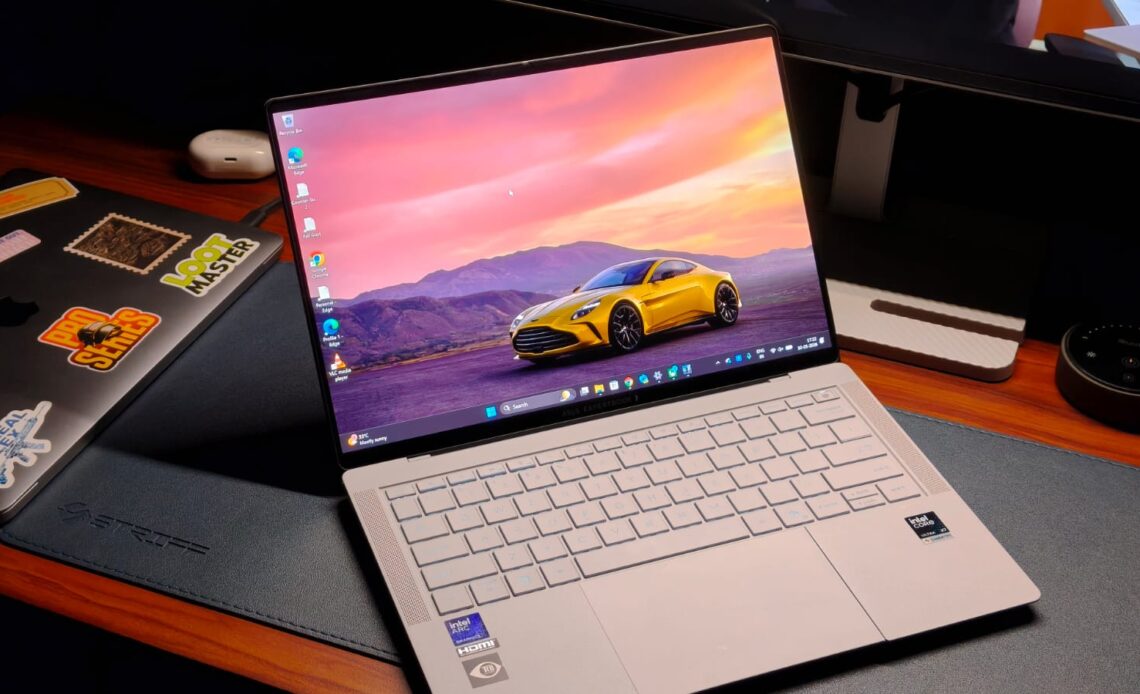
As a tech reviewer, I have a confession to make. Despite my years of testing Windows laptops, I’ve always come back to my MacBook after a review period with a sigh of relief. That’s because, regardless of how expensive a Windows laptop is, it’s never really had the cohesive experience I’ve come to love in Apple’s walled garden. Maybe their speakers aren’t good, or the physical trackpad requires a lot of force to actuate. You get the point. So, when Asus sent over their new executive ExpertBook Ultra, I thought I’d test it out, run a few tests, and be back on my MacBook in no time. Well, that hasn’t happened.
The Asus ExpertBook Ultra is the first laptop I’ve tested that has crossed that threshold of desirability. But what makes a great Windows business laptop? Some might say portability, while others could point to factors like performance, sufficient RAM, and AI capabilities. What if you want all those features rolled into one? That’s what best describes the Asus ExpertBook Ultra. It starts at ₹2,39,000 or $3,499, and is the first laptop to debut Intel’s latest Panther Lake processors. I’ve been testing it for a better part of three weeks now, and this review should help you decide if it’s worth splurging the big bucks.
Asus ExpertBook Ultra Review
Summary
The Asus ExpertBook Ultra is playing a serious game against heavy hitters like the Dell XPS and the Lenovo ThinkPad series. And there’s something for everyone. The design is exceptional, quite possibly the best I’ve tested, with durability that should withstand anything. The 3K Tandem OLED 120Hz display is perfect, and you won’t have to deal with reflections. Let’s not forget the performance that is comfortably a mile ahead of the competition, in both numbers and thermal headroom
Design & Hardware

I was one of the few journalists invited to the ExpertBook launch event about a month back, and that’s where I first went hands-on with the laptop. The first thought I had was how different it looks and feels compared to other premium laptops. You might know the feeling of the all-aluminum MacBook, but the ExpertBook Ultra is completely different.
It’s made of CNC-machined magnesium alloy with a ceramic coating on top. It’s hard to put it into words, but the finish feels textured, almost powdery in a way, yet still very premium. You also don’t have to deal with smudges and fingerprint stains on your expensive machine. Color options are limited to two: either black or an off-white. I got the Morn Grey unit, and it’s definitely the way to go. Thanks to the texture, the color shimmers in sunlight, and wherever I went with the laptop, people asked what I was using.
A business laptop is for those who’re running from one office or coffee shop to another, most of the time with a laptop in hand. This means portability and weight are the main concerns. When I first picked up the ExpertBook Ultra, I expected it to weigh a decent amount because of its powerful internals. Well, looks can certainly be deceiving since it only weighs 0.99 kg, which is quite frankly insane. For context, my MacBook Air M1 weighs 1.29 kgs. And this weight difference is noticeable when carrying the laptop every day.

But you might ask, if the Ultra doesn’t weigh much, surely it won’t be durable. That surely won’t be the case, as ExpertBook laptops are the most durable machines I’ve ever tested. I’ve even stood on one, and it escaped without any damage. The Ultra is MIL-STD-810H-rated and should survive several bumps and drops just fine. At the event, Asus also told us to hold it up by the corner of the screen for a photo, which was a weird flex.
Since connecting to other gadgets is a basic requirement in an office, the ExpertBook Ultra has a decent selection of ports. You get dual Thunderbolt 4 USB-C (one on each side), along with a full-size HDMI 2.1, a USB 3.2 Type-A, and a headphone/microphone combo jack.
Best Windows Keyboard & Trackpad Combo

From spending over five years in the MacBook world, I’ve grown accustomed to the haptic touchpad, and it’s easy to see why. A haptic trackpad eliminates one more physical component, making it durable and ensuring consistent actuation energy wherever you click. That’s something Windows laptops have suffered from for years, because clicking on the top corners requires more force than moving a mountain.
The ExpertBook Ultra is one of the few laptops that has fixed this problem, and I couldn’t be happier. The trackpad is a large glass surface that spans edge to edge and comprises six pressure sensors. I found the tracking to be exceptionally good, without that sticky feeling. While the pressure actuation was a little lower than on the MacBook, I got used to it in no time. The palm rejection works beautifully, and the gestures are well supported.
The keyboard is high on the priority list of professionals, and Asus has kept that in mind. The layout is fairly standard in the sense that there is no learning curve. All keys are in the correct place, and even the 1.5mm travel is pretty respectable. The keys feel tactile without making much noise. There are different stages of backlit, and it’s bright enough to overcome the lack of contrast with the white keyboard deck. Still, the best part about the ExpertBook Ultra’s keyboard is that it’s splash-resistant. A small coffee spill or splash of water shouldn’t cause any issues as long as you clean it up quickly.
Display & Camera

We’ve seen OLED displays on laptops for quite some time. In fact, Asus was one of the first to implement it. Still, they are yet to reach the masses because OLED panels, unlike those on phones, consume more power. That’s one problem the Asus ExpertBook Ultra doesn’t have because it uses a 14-inch 3K Tandem OLED with a 120Hz refresh rate. For the uninitiated, a Tandem OLED panel combines multiple layers of light-emitting organic material to deliver higher brightness and lower power consumption. Thanks to this, the laptop has a peak brightness of over 1400 nits in HDR and 600 nits in regular mode.
If I had to use just one word to describe the Ultra’s display, it would be perfect. You can’t get any better than this, with colors that look exceptionally vibrant thanks to 100% DCI-P3 coverage, Pantone validation, and a Delta-E of less than 1. That’s more than enough for creative work like video editing without a hitch. As expected, movies and TV shows were a dream to watch.

That’s not all, as the laptop fixes one major pain point I’ve had with premium laptops. That’s glossy displays. They pick up dust quickly and get dirty with smudges that are almost impossible to clean. With the ExpertBook Ultra, you get a matte glass panel that cancels out almost all reflections pretty effectively, meaning I could work with the sun shining behind my back. Just don’t try this in 45-degree heat. Another upside is the touch functionality. Say what you want, touch is great for working on the go. For the people concerned with durability, Asus has used Gorilla Glass Victus, which is super durable. Enough to withstand over 100 kg of pressure, as they showcased in the event.
The 1080p webcam on the ExpertBook Ultra is perhaps the only thing that’s not very special. It’s decent for calls, and looks comparable to the MacBook. The wide field of view means you don’t have to squeeze into the frame during presentations, and it also supports Windows Hello functionality.
Performance

No business laptop will ever be desirable if it doesn’t have enough power to run multiple apps. Since the Asus ExpertBook Ultra is the first to get the Panther Lake chips, specifically the Core Ultra X7 358H, I was quite excited to test it out. The processor has a total of 16 cores, out of which four are performance cores, another eight are efficiency cores, and the last four are low-power efficiency cores. It’s paired with 32GB of LPDDR5x RAM at 8533 transfers per second and 2TB of Gen 5 storage, which can achieve read speeds over 14,000 MB/s.
As expected, the laptop feels effortlessly fast in everyday use. For example, my work is mainly on Chrome and Slack, where the processor handled everything super efficiently. I could open up more tabs than I need without a hitch, all while still running something in the background. Productivity apps are handled similarly well, and I connected them to my 2K monitor, where the experience was absolutely spotless.
What I found fascinating about the Ultra is that it’s not just a laptop for business people. In fact, if you’re a creator and need a serious on-the-go machine, you actually could take a look here. That’s because I fired up Da Vinci Resolve and tried my hand at editing a 4K reel I shot in Thailand. While my editing skills need a lot of sharpening, the Ultra could handle multiple streams of 4K videos and even play them back without slowing down. I also added some color grading to the videos, and it all went fine. In typical Asus fashion, there are several AI-centric features, such as MyExpert. It’s a personalized AI chatbot that quickly helps with your needs with on-device processing.

Since my skill set with demanding tasks only goes so far, I also ran a series of benchmarks to see how the Panther Lake processor ranks among its peers. Starting with Cinebench R24, the Ultra X7 358H scored 1,019 points in the multi-core test, roughly doubling the performance of the Ultra 7 258H, found in the likes of the ThinkPad X Carbon. With PCMark 10, we saw a 30% jump in the Ultra X7 358H’s performance compared to last-gen alternatives, reaching scores of 9,903.
Graphics in the ExpertBook Ultra are handled by the integrated Arc B390 GPU. Intel’s recent emphasis on GPUs means the B390 means serious business. I put it to the test with 3DMark’s TimeSpy test, where it scored 6,712 points. To put this number in context, though, I also played a series of games. Don’t get me wrong, the ExpertBook Ultra is not designed for serious gaming, but can it play AA or sometimes even AAA games? Yes, absolutely. Starting with lighter titles like F1 2025, I easily got over 100 fps on High settings with XeSS turned off. Kicking things up to titles like Indiana Jones: The Great Circle and Cyberpunk 2077, I averaged around 50-60 fps at 1080p with Ultra detail settings. If you’re concerned with eSports titles like Counter-Strike 2 and Valorant, they won’t break the ExpertBook Ultra, as it can easily achieve full 120 fps at the highest settings.
Battery Life & Speakers

While the 70Whr cell is pretty standard for a thin-and-light laptop, Asus has incorporated a new 2S2P architecture, which, in theory, is more efficient. My testing proved that theory to be right. On an average workday, which includes spending hours on Chrome, watching YouTube, and a few episodes of Better Call Saul, the ExpertBook Ultra lasted me a full day with some charge left to spare. Charging is handled with a 90W USB-C PD charger, which means you can go from 0%-50% in just thirty minutes. That’s enough time to charge between meetings and have enough for your super-long presentation.
Speakers on Windows laptops have usually not been a priority for forever. Most of them fire directly on the table, which inherently limits their output. But the Asus ExpertBook Ultra is the first laptop I’ve heard of that blew my MacBook out of the park. The speakers, of which there are six, sound at least twice as loud, with a wider soundstage, accurate dialogues, and bass that hits the spot. The treble is usually on point. You can make out the different instruments, and the highs don’t screech the ears at all. Almost everyone whom I showed the Ultra’s speakers was in awe of the quality, so you know it’s not just me yapping.
Verdict

Starting at ₹2,39,000, the Asus ExpertBook Ultra is playing a serious game against heavy hitters like the Dell XPS and the Lenovo ThinkPad series. Asus markets it like a business laptop, but my testing found the ExpertBook Ultra to be more capable than just handling spreadsheets. It’s a machine that caters to power users, irrespective of whether they work in an office or from a cozy cafe in Bali, editing videos or programming for their clients.
There’s something for everyone. The design is exceptional, quite possibly the best I’ve tested, with durability that should withstand anything. The 3K Tandem OLED 120Hz display is perfect, and you won’t have to deal with reflections. Let’s not forget the performance that is comfortably a mile ahead of the competition, in both numbers and thermal headroom. Sure, Dell and Lenovo are more established names when it comes to professional laptops, but I think it’s time we give Asus that status as well. And if you’re shopping in the segment, it’ll be a shame not to consider the ExpertBook Ultra.