
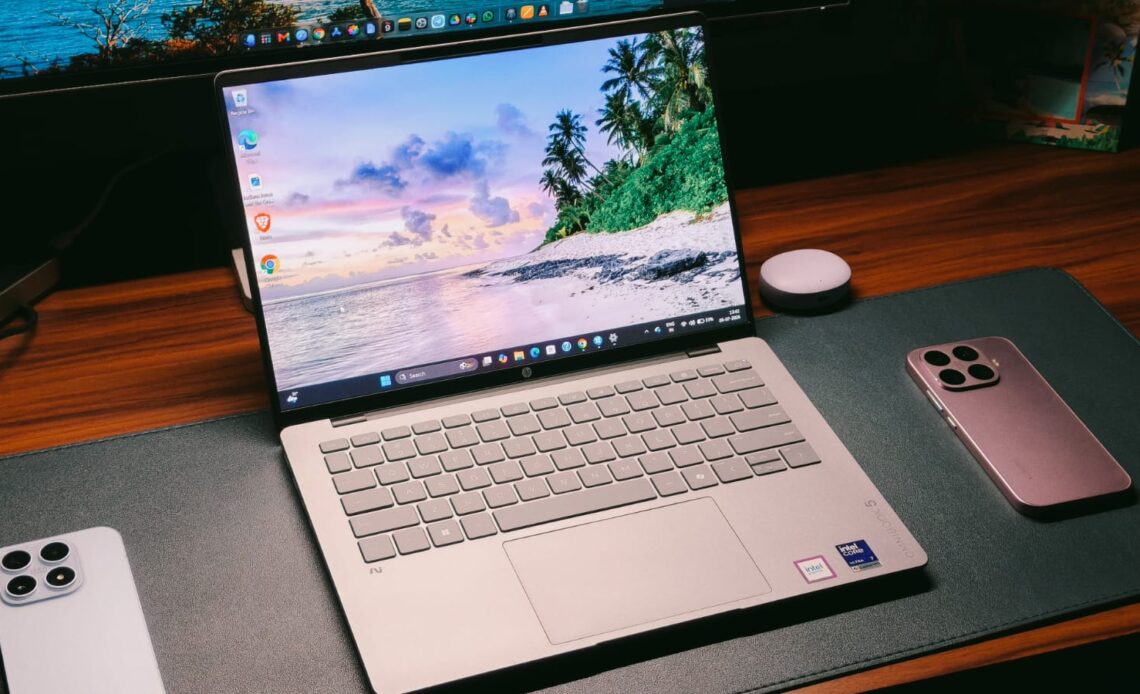
As much as I love reviewing extraordinary laptops like the ZenBook Duo, with its swinging dual screens and detachable keyboard, the truth is most people will never be able to buy one, simply because innovation like that costs money. And given that we are in the great AI era of 2026, with RAM prices having more than doubled, it’s really hard to find a laptop that gets the job done without leaving a huge dent in your wallet. HP’s OmniBook line is a great example of such laptops, and if you’re in the market for a mid-range, powerful laptop, I may have found a solution: the OmniBook 5.
The OmniBook 5 packs Intel’s latest Panther Lake Core Ultra 7 processor, 16GB of LPDDR5X RAM, a sophisticated design, and an OLED display. All this for ₹145,999 seems like a decent package by 2026 standards, which is why I have been testing the laptop for the past 2 weeks. It’s been my daily driver and companion to several coffee shops and a little work trip to Delhi. Is it worth it for your workflow? This review will answer that for you.
HP OmniBook 5 Review
Summary
The HP OmniBook 5 has all the pillars of a great professional laptop. The design is premium yet sophisticated so as not to draw too much attention. The 2K OLED display is gorgeous not just for watching movies but also for working with spreadsheets. And the performance keeps up with ever-increasing user demands, whether for video editing or code compilation. Not to mention the awesome typing experience and plenty of ports.
Design & Hardware

Design is one area where everyone thinks differently. Most people like an all-metal chassis, while some do prefer plastic. The HP OmniBook 5 is not for the latter. Its chassis is made from anodized aluminum, and I’m a fan. The finish is cool to the touch and doesn’t pick up fingerprints, which is a lifesaver when you’re trying to take photos of the unit. If you’re familiar with the MacBook’s finish, then the one on the OmniBook is a tad bit rougher. In short, the laptop feels elegant and not out of place in a coffee shop or in a corporate meeting. Besides my silver review unit, there’s also a Sahara color option.
Open up the laptop, and you’re greeted with the same premium finish. The keyboard deck is also silver, and there’s a nice cutout to open the laptop with just one hand. I did see some wobble on the screen, but that’s nothing to worry about. The hinge is strong enough to hold the screen while you run to your boss and show them a presentation. Even so, the best thing about the OmniBook 5 is its portability. The laptop weighs just 1.3kg and is 13mm thick. The 14-inch form factor is perfect for attending quick work calls on the go.


To put that to the test, I took the OmniBook 5 on a work trip to Delhi. The lightweight nature meant I wasn’t dragging a brick in my backpack, and my shoulders didn’t hurt even after several hours of travel. I used the laptop to write some articles on my lap at the airport. Despite the air vents underneath, I observed no overheating problems, but more on that in the performance section. As far as durability is concerned, I’m no JerryRigEverything. However, the fact that there was no damage to the OmniBook 5 after I accidentally dropped my backpack at the airport makes me think durability shouldn’t be a concern. I also observed no deck or screen flex even with some substantial force.
When it comes to ports, HP, thankfully, hasn’t skimped on anything. With the OmniBook 5, you get two USB-A ports, one with 10 Gbps signaling. Beyond that, there are two Thunderbolt 4 USB-C ports with 40 Gbps signaling rates and charging support, an HDMI 2.1 port, and a headphone/microphone combo jack.
Keyboard & Trackpad

A good keyboard is quintessential for a professional laptop. After all, most of your days will pass making PowerPoints, editing documents, and replying to emails. I’ve tested many laptop keyboards, and the one on the HP OmniBook 5 is definitely up there. The keys have a similar tactile feel to my MacBook, and that’s a great thing. Feedback is present; there’s a satisfying click after every keystroke, and I didn’t feel cramped when typing long articles, such as this review, on the laptop. I was able to adapt the layout in less than an hour, and even the backlight is strong enough to make the words legible against the light-colored keys.
Almost the same praise carries over to the trackpad as well. It’s not a fancy haptic trackpad, but as far as physical trackpads go, it’s up there at the top. The tracking was accurate throughout the surface, and the best part was the clicks. HP has the easiest-to-use clicking mechanism, which requires little force to activate. Some people may not like that, but since I’m coming from haptic touchpads, the lower activation force for clicking was very helpful. The only gripe I have is that the surface feels a bit rough, which introduces some friction when scrolling.
Display & Camera

We have two ingredients of a professional laptop ready (keyboard & trackpad). It’s now time for the third: the display. That’s because a laptop isn’t just for editing documents. People also like to watch movies on them, too. I have some good news for those people, as the HP OmniBook 5 features a 14-inch 2K OLED panel with a 60Hz refresh rate. As expected, watching shows on the laptop is an absolute joy. The colors feel vibrant without being oversaturated, the blacks are truly black, and even the dynamic range was decent. To be fair, it’s not the brightest display around, with a peak of 300 nits, but when coupled with the deep blacks, the contrast is very decent. I had loads of fun watching an episode of Clarkson’s Farm while on my way back from Delhi.
I have some good news for all the video editor friends as well, since the OmniBook 5’s panel covers 100% of the DCI-P3 color space. You can easily edit videos without worrying about the colors looking off. The 16:10 aspect ratio also helped fit a few extra spreadsheet columns. Just be wary of working in direct sunlight, as the glossy panel reflects a lot. As for the camera, it’s an FHD unit, and like most other Windows cams, it works okay. I found the colors leaning on the cool side, but the sharpness was decent.
Performance

The fourth ingredient of the professional laptop is performance. In fact, it’s the most important pillar so far, as I’m sure anyone would hate waiting for an app to load. With the HP OmniBook 5, you get the latest Panther Lake Intel Core Ultra 7 355 processor, paired with 16GB of LPDDR5X RAM running at 6,800 MHz and a 1TB NVMe SSD. CrystalDiskMark reported read/write speeds of 6,347 MB/s and 5,219 MB/s, respectively, which are on par with other ultrabooks like the ZenBook 14.
In everyday use, the OmniBook 5 is a breeze. I found it a tad faster at launching apps than some of the other laptops I’ve tested recently. There were no hiccups switching between apps, and the 16GB of RAM was enough to keep my 20 Chrome tabs open while I was writing articles. I could also multitask alongside all of that, so office work shouldn’t be a problem for anyone.
For demanding users like video editors, I installed DaVinci Resolve on the OmniBook 5. Then I imported a couple of 4K streams I shot at an event, trimmed them, and did some color grading. Sure, my editing workflow isn’t the most taxing, but if you’re making content for Instagram, then the OmniBook 5 packs enough punch. Similarly, for all my coders, I ran a Python script in VS Code, and it compiled without much delay.
Benchmarks & Gaming

Still, as good as my editing and coding skills are, I can’t test everyone’s workflow here. Maybe you’re into 3D modeling or music production; that’s where benchmarks become more useful. Yes, they don’t paint the full picture, but they do give a number for everyone to judge things. In Cinebench R23, the OmniBook 5 scored 1,907 in the single-core and 10,045 in the multi-core tests. That’s nearly 30% more multi-core performance than the AMD Ryzen AI 5 430. PCMark 10 gave the laptop an overall score of 7,501.
But can the OmniBook 5 game? That’s the eternal question of every laptop buyer. And the answer depends. If by gaming, you mean AAA titles like Cyberpunk 2077 and Indiana Jones: The Great Circle, then nope. However, the integrated graphics can handle esports titles like Valorant and CS:GO pretty fine. I got roughly 190 FPS on high settings in Valorant, which was more than enough to land a few headshots. Thermals are managed well for everyday tasks, but with gaming, I did see some throttling after an hour.
Battery Life & Speakers

If you just need one reason to get the HP OmniBook 5, it’s the battery life. HP has fit in a 59 WHr cell, which might not sound like much on paper, but with Intel’s new efficiency gains, the laptop just refuses to die. On my typical workday, which is writing articles, doing research on Chrome, replying to Slack messages, and watching YouTube, I got roughly 13 hours of screen-on time. That’s more than what I’m currently getting from my MacBook. You also get a 65W fast charger inside the box, which takes the laptop from 0% to 50% in just 30 minutes.
I’m not the biggest fan of downward-firing speakers, since they inherently limit the output and get muffled when the laptop’s on a soft surface. Sadly, that’s also true with the OmniBook 5, but its speakers are quite good. They are loud enough to fill a room, and I did hear many details, especially in the vocals. All that said, they don’t sound as wide and full as the ones on my MacBook, and prioritize the highs a bit much. Just a small complaint.
Verdict

At ₹145,999, the new HP OmniBook 5 has all the pillars of a great professional laptop. The design is premium yet sophisticated so as not to draw too much attention. The 2K OLED display is gorgeous not just for watching movies but also for working with spreadsheets. And the performance keeps up with ever-increasing user demands, whether for video editing or code compilation. Not to mention the awesome typing experience and plenty of ports. Sure, I can nitpick about the speakers or the lack of a higher-refresh-rate screen, but those aren’t big downsides, which is why the OmniBook 5 gets my recommendation.