
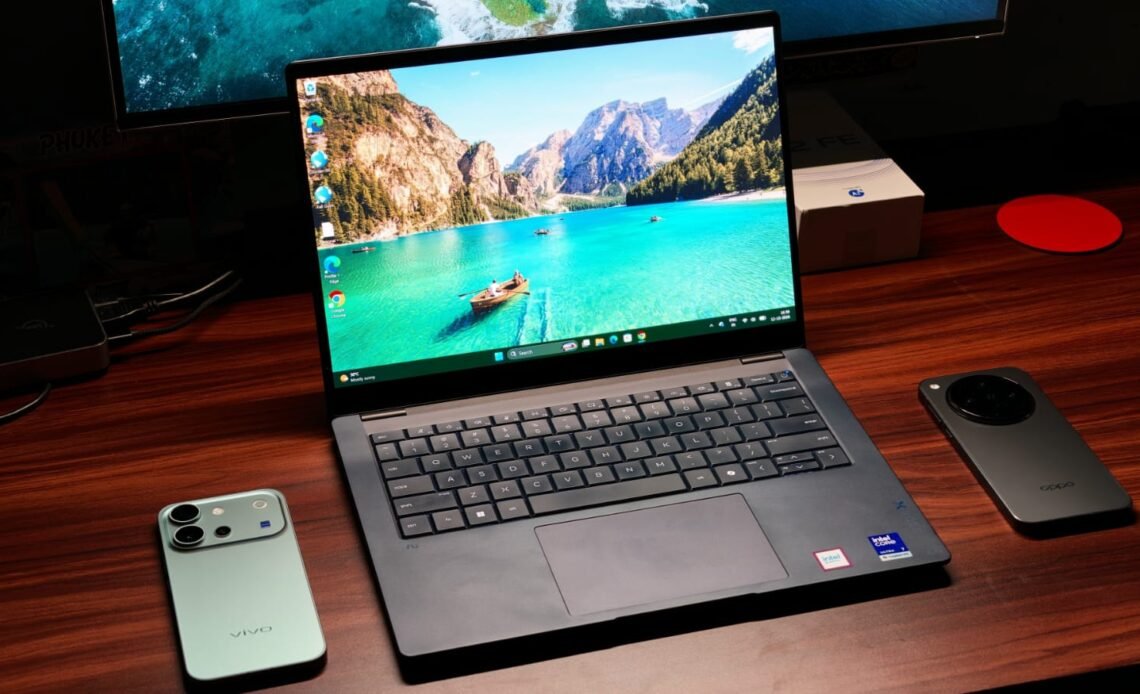
Premium Windows laptops need to be like a Lexus: powerful enough to handle demanding tasks while looking great and lasting for years to come. Sure, you can take the BMW i8 route and buy the prettiest laptop you can find. The Surface Laptop is one example, although it might not offer the performance headroom you need. One great example of my Lexus analogy is the OmniBook line. I’ve been testing HP’s premium laptops for years, and they’ve never failed me. Most of my reviews have ended with something like, “Oh, this laptop is great and worth the recommendation.” That’s because HP knows its target audience and caters to their needs almost perfectly. And if you’re in the market for a new laptop, HP’s new HP OmniBook X 14 is worth a look.
It starts at ₹189,999, and for that you get the latest Intel Core Ultra 7 356H processor, enclosed inside a very premium chassis, and a 3K AMOLED touch display. The OmniBook X 14 gets most things right. Maybe it’s the gorgeous design, the rapid performance, or just a mix of everything, but I do see it as a genuine MacBook replacement, given Apple’s increased prices. But does the OmniBook X 14 fit your workflow? To find out, I’ve been using it as my primary laptop for the past two weeks (I’m writing this review on it, btw) and have taken it to a couple of launch events. Here’s how it held up.
HP OmniBook X 14 (2026) Review
Summary
The HP OmniBook X 14 has a lot going for it. It looks gorgeous, feels premium, and packs enough performance to handle everything from everyday work to 4K video editing. The 3K 120Hz OLED display is a treat, the keyboard is surprisingly comfortable, and the battery life is good enough to get you through a full workday without hunting for a charger
Design & Hardware

Design is a very subjective matter. A laptop I love the look of could be something that you hate. Regardless, I think almost everyone will love the HP OmniBook X 14’s design. It’s simple yet super elegant, with an anodized aluminum case. The dark blue color is the cherry on top, giving it a special feel. During my time, plenty of my colleagues asked what laptop I was using, simply because it looks so pretty. HP says the X 14 has passed MIL-STD 810H testing, which covers several durability tests. That doesn’t mean you should go around dropping it, though.
There’s also the new HP logo on the back. Open the laptop, and the premium feel continues inside. The keyboard deck is the most striking, but I’ll cover that in another section. What did surprise me was the hinge. I’ve always said MacBook hinges are the best. And while that sentiment still holds true, I love HP’s approach. There’s more resistance when closing the lid than when opening it, and I love the satisfying thud it makes when it shuts. You can still open the X 14 with one hand, and the screen does not wobble. There’s just one tiny problem. The X 14 picks up smudges. So, when you’re eating Doritos while watching the latest episode of Lanterns and touch the laptop, you’ll leave a mark. You can fix it with a cleaning cloth, but people like me are too lazy to do it.

Perhaps the most important thing when buying an ultrabook is portability. It needs to be light enough to carry through meetings all day. For those worried, I’ve got good news. At 1.3 kg, the X 14 is definitely light. I had no problems carrying it in my arms all day, going to different colleagues and asking them about a project. I also took the laptop on a work trip, and it didn’t make my shoulders hurt while I stood in the airport check-in line.
HP has us covered in ports as well. The left side houses a Thunderbolt 4 Type-C (USB Power Delivery 3.1, DisplayPort 2.1) port, a 10 Gbps USB Type-A port, an HDMI 2.1 port, and a headphone/microphone combo jack. On the other side, there’s another 10 Gbps USB Type-A port and a Thunderbolt 4 Type-C port.
Keyboard & Trackpad

It’s no secret that the most visually striking thing about the HP OmniBook X 14 is its keyboard. That’s because HP decided we don’t need key spaces anymore. Truth be told, I was worried about this new layout, as I’ve seen Dell’s implementation and how much people hate it. But after giving the X 14’s keyboard a couple of days, I absolutely love it. The lack of gaps between the keys makes the keyboard feel different, but I found the larger keycaps easier to type on, with fewer mistakes overall. As for the keys themselves, they are very tactile, and the feedback is top-notch. There’s even decent travel, without that annoying noise.
The trackpad deserves just as much praise. Sure, it’s not the haptic kind, but HP has done a stellar job. And I know many people prefer physical trackpads. If that’s you, then the X 14’s trackpad will feel amazing. The clicks are super easy, the tracking surface is large, and it’s not sticky.
Display & Camera

Unlike smartphones, where most flagships have similar displays, the laptop space is very different. We have several display types, and I think HP has chosen the best. The OmniBook X 14 features a 14-inch 3K (2880 x 1800) OLED panel with a 120Hz refresh rate for extra-smooth scrolling and gaming. As a surprise to no one, watching content is a pleasure. The resolution keeps everything crisp, and the deep blacks and vibrant colors make any show pop out. I watched the latest sensation, Lanterns, on the X 14, and the greens really jumped out, in a good way. Once you go OLED, you’re never coming back.
With peak brightness rated at 500 nits, the panel remained readable at Delhi airport, even with bright sunlight behind me. The glossy finish does catch reflections, though. If you’re watching HDR content, the brightness can reach 1,100 nits. Beyond that, the panel covers 100% of the DCI-P3 color space, so content creation and color grading won’t be a problem. There is one more thing: touch support. It unlocks a whole new level of using the X 14. I loved using the laptop in my hands while roaming around and tapping the screen for input. Not to mention, the display is 16:10, which is much better for editing spreadsheets and writing articles.
The 5MP webcam is fairly standard. While it won’t break any image-quality benchmarks, the video quality during calls was decent, with adequate sharpness and okay-ish colors. It also supports Windows Hello, so signing in to your laptop is quick and easy.
Performance

Performance is the deciding factor when reviewing an ultrabook. The HP OmniBook X 14 runs on Intel’s Core Ultra 7 356H, a 16-core processor with four performance cores, eight efficiency cores, and four low-power efficiency cores. My test unit also came with 16GB of LPDDR5X memory running at 6,800 MT/s and a 1TB PCIe Gen 4 SSD. The X 14 was a powerhouse. It handled every daily task of mine, whether I was researching with 20 Chrome tabs and YouTube Music running or editing sizeable spreadsheets. There were no noticeable stutters, and the 120Hz refresh rate kept everything feeling smooth.
Recently, I started making videos for my YouTube channel, which was the perfect opportunity to test video-editing performance. In DaVinci Resolve, the laptop handled multiple 4K video tracks with smooth playback. Even when I made small color-grading adjustments, the changes appeared almost instantly. The X 14 could also be great for coders and programmers, but my VS Code testing was pretty limited, so keep that in mind.

To test the X 14’s performance headroom, I also ran a series of benchmarks. The laptop scored 2,479 in Geekbench’s single-core test and 15,488 in the multi-core test. In Cinebench R24, the single-core score was 120, and the multi-core score reached 810 points. As for the Intel iGPU, it scored 22,428 points in Geekbench’s GPU score.
The integrated GPU’s benchmark score looked promising, so I put it to the test with a few games. Let me set the scene, though: this isn’t a laptop for demanding AAA games. But if GTA V is your jam, you’re in luck. I got 90 FPS at medium to high settings. For eSports titles like CS:GO, I got more than 150 FPS, which is pretty good. All while gaming, the laptop stayed cool to the touch and never thermal throttled. That’s thanks to the new dual-fan design.
Battery Life & Speakers

Battery life is another strong point for the HP OmniBook X 14. The 70Wh battery will absolutely last you a full day. For some context, I unplugged the X 14 and took it with me to Delhi at 9 AM. I worked a couple of hours at the airport, watched an episode of Lanterns on the flight, worked 4 more hours at the hotel (my work is writing articles, researching on Chrome, and Slack), and finished the day with some YouTube. After eight hours of screen-on time, I still had 20% battery remaining. That’s great endurance. As for charging, HP has you covered, with the 100 W USB Type-C GaN charger included in the box. It recharges the battery from 0%-50% in just 30 minutes.
The only place I’d deduct a couple of points for the OmniBook X 14 is with the speakers. They are downward-firing, so your volume will depend on the surface. They were fine for watching YouTube, but I wouldn’t expect them to fill a room.
Verdict

At ₹189,999, the HP OmniBook X 14 has a lot going for it. It looks gorgeous, feels premium, and packs enough performance to handle everything from everyday work to 4K video editing. The 3K 120Hz OLED display is a treat, the keyboard is surprisingly comfortable, and the battery life is good enough to get you through a full workday without hunting for a charger. Sure, the speakers could be better, and the glossy display can be a pain under bright lights, but those are compromises I’m willing to make. If you’re looking for a powerful, well-built ultrabook for work and creative tasks, the OmniBook X 14 deserves a spot on your shortlist.