
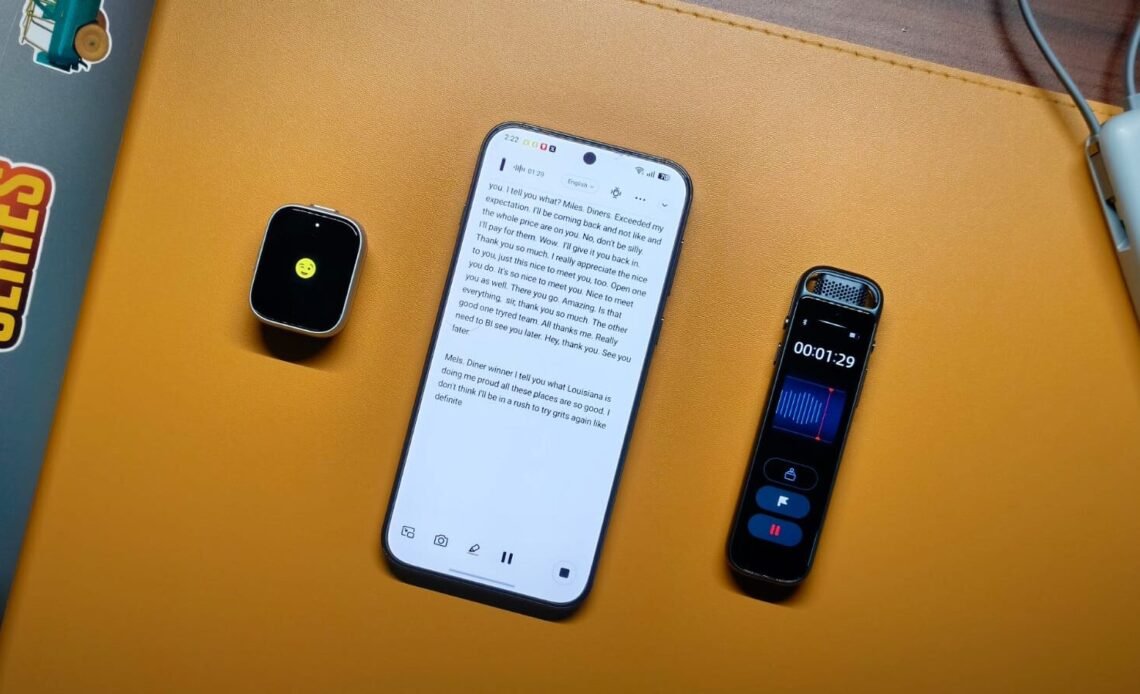
Back in my college days, I remember recording lectures on a budget Android phone, hoping to save all the important information right before exams. Yes, it wasn’t a perfect solution. My phone’s microphone wasn’t the best, and sorting through an hour-long lecture just to find something was like looking for a needle in a haystack. The same problems still apply in my professional life. I like to record in-person meetings because of my goldfish memory, but it’s a bit of a faff. And I’m not alone. Many professionals suffer from this exact problem, which is the reason the iFlyTek P1 and P1 Pro exist.
In essence, they are AI voice-recording devices that help you record meetings, transcribe them, and provide detailed summaries of what needs to be done and when. You can also translate meetings into different languages. They also work as conventional voice recorders for taking interviews and such, but the real appeal is with the Deepting app. But should you spend $119 on the P1 or $159 on the P1 Pro? To find out, I’ve been testing both for the better part of two weeks, recording meetings and sorting through all the information and its legitimacy.
iFlyTek P1 & P1 Pro Review
Summary
The iFlyTek P1 and P1 Pro solve the genuine problem of recording and sorting through meetings, turning it into an automated experience that requires little oversight. The recording quality, even for larger conferences, was excellent, and iFlyTek’s AI does a really solid job of transcribing the content. This, coupled with the fact that you can ask questions about the meeting directly, makes both genuinely useful tools.
Design & Hardware

The iFlyTek P1 and P1 Pro are fundamentally different devices. Yes, both record meetings, but that’s where the similarities end. Starting with the P1, it looks like a smartwatch. A small rectangular device with a display on the front and buttons on the top and left side. The first time I unboxed it, I mistook it for an Apple Watch, and I wasn’t the only one who thought that. The second thing I noticed was the weight, or lack thereof. The P1 is extremely light because you actually have to wear it. It comes with a magnetic accessory, which sticks to the back. You can either hook the magnet onto your shirt, like those fancy microphones, or use the clips. The latter are spring-loaded so they won’t fall off whenever you move.
The build is plastic, but I don’t mind since the P1 is extremely well made, with no moving parts or loose ends. There are two buttons on the device, each serving a different purpose. You power it on by holding the button on the left side for two seconds. Now, press the top button for two seconds to start/stop recording. So what does the display actually do? Well, that’s a great question you may have asked. The display on the P1 is very small. Possibly the smallest display I’ve ever seen to date. And it’s not that useful. All it does is show a winking emoji when the device powers on and a microphone emoji when it’s recording. Nope, you can’t change any settings or listen back to what you just recorded. For all that, you’ll need to rely on the Deepting app.

If not having a screen or speakers to play back what you just recorded is a problem for you, then the P1 Pro is what you need. It ditches the smartwatch form factor for a more elongated design, with a 3.2-inch OLED display nestled in between. It runs on custom software, allowing you to toggle between omnidirectional and directional recording, check the stored files, and adjust settings. The screen is plenty responsive, and iFlyTek has designed the UI quite thoughtfully. You also get a more premium metal-and-glass build, along with an extra flagging button to mark important moments of a meeting. Sadly, you can’t hook the P1 Pro to your clothing, so it’s more of a hands-on tool you might see people using during interviews.
Microphones & Recording Quality

As with the design, the microphones on the iFlyTek P1 and P1 Pro are different. The smaller one has two mics that can record either omnidirectional or directional audio. iFlyTek says it can record someone speaking clearly up to 5 meters, but I found the reality to be different. With some background noise, you should always aim to be around 3-4 meters max from the subject, after which the AI will have a hard time transcribing all the information. Speaking of the quality, I like it. The mics pick up conversation effectively without letting background noise interfere much. You will hear the playback clearly and not have to guess what the subject was saying.
The P1 Pro adds an extra mic, bringing the total to three. This increases the effective range of the P1 Pro to 10 m, which should be sufficient for recording conference room meetings. There is also support for 96 kHz/24-bit hi-res audio, which I put to the test when doing an interview with an eSports player at a PUBG Mobile tournament. Despite the abysmally loud background music, the P1 Pro picked up both of our voices surprisingly well, and the details were on point. I also put it in a conference room, and it effectively picked up voices from about 8 m away. Though after that, picking up quieter words became a problem. Both devices come with 64GB of onboard storage, which should be sufficient for years to come.
App Experience
So far, I’ve been impressed by the iFlyTek P1 and P1 Pro, but the app experience is the real deciding factor. Both devices pair with the Deepting app, available on both the Google Play Store and the App Store. Once paired, the app gives you unlimited cloud storage and 300 minutes of transcription every month. That was enough for a casual user like me, but if you’d be using it every day, I can see this being limiting. If that’s the case for you, there’s a Deepting Pro subscription. I’m not the biggest fan of subscriptions, but it does give you 1800 minutes of transcription, so you can be the judge.
All that aside, the recordings are synced from the device pretty fast. Each recording is stored separately, and you can play them at different speeds. There is a transcribe button front and center, which uploads your conversations to a remote server for processing. As for the quality itself, I found no problems. The transcription was accurate over 95% of the time, with clear separation between speakers, sentences, and pauses. It can sometimes mess up specific names, but that wasn’t a big problem and happened only 1 out of 10 times. You can also translate these transcriptions into 11 different languages.
On the top right, there’s the AI button, which itself has three sections: Overview, Notes, and Ask AI. The first gives you a concise summary of the meeting. If you want more detail, then the Notes section is where you need to be. It formats the content into headings, points, and other elements, which was great for digging up important information from an hour-long corporate jargon meeting. There’s also this ChatGPT-powered Ask AI feature. With it, you can ask questions about the meeting directly, instead of having to find everything yourself.
Verdict

After extensive testing, I can say both the iFlyTek P1 and P1 Pro deserve a place in the market. They solve the genuine problem of recording and sorting through meetings, turning it into an automated experience that requires little oversight. The recording quality, even for larger conferences, was excellent, and iFlyTek’s AI does a really solid job of transcribing the content. This, coupled with the fact that you can ask questions about the meeting directly, makes both genuinely useful tools. Yes, they do have a few flaws, namely the subscription, but if you have a use case, you should consider them.